
 by
by
Overview ➣ This comprehensive guide explains how to add real-time cart notifications to WooCommerce using the All in One Woo Cart plugin, covering installation, setup, customization, and available features.
Running a WooCommerce store means creating a smooth and engaging shopping experience.
Real-time cart notifications give customers instant visual feedback, confirming their actions without reloading the page.
For example, when a shopper adds a product to the cart, a sleek, subtle message pops up, reassuring them and encouraging continued browsing.
In eCommerce, communication is crucial; these notifications not only confirm actions but also alert admins, build trust, boost conversions, and even help recover abandoned carts.
Why Add Real-Time Cart Notifications to WooCommerce?
In WooCommerce, adding an item to the cart typically triggers a page reload or a basic message at the top of the screen. This approach can interrupt the shopping flow and feel inefficient.
Real-time notifications offer a more streamlined and user-friendly alternative, enhancing the overall customer experience. Here’s why they are important:
- Instant Feedback: Shoppers instantly see that their item has been successfully added to the cart, giving them confidence and enhancing the shopping experience without disrupting their browsing.
- Improved User Experience: It eliminates the need for a page refresh, keeping the user on the product or shop page, which encourages further browsing.
- Reduced Cart Abandonment: Clear, instant confirmation reduces confusion and assures the customer their action was successful, making them more likely to complete the purchase.
- Mobile-Friendly: Great for shoppers using phones, giving quick responses and an easy shopping experience.
With the right plugin, setting up this feature takes only a few minutes. In this guide, we’ll show you how to add real-time cart notifications to a WooCommerce store using ThemeHunk’s All in One Woo Cart plugin.
All In One Woo Cart

The All-in-One Woo Cart plugin enhances the default WooCommerce cart experience with multiple cart display options, such as floating, fixed, or menu-based, along with real-time updates and advanced styling features.
Key Features
- Multiple Cart Layouts: Floating, fixed, and dropdown cart on the header that stays accessible as users browse.
- Real-Time Cart Notifications: Live cart updates, including item additions/removals, and quantity changes, without requiring page reloads.
- Fly to Cart Animation: “Fly to cart” animations, where the product image flies to the cart icon, are available in the Pro version.
- Cart Display and Customization: Header menu integration, customizable cart styling, and the ability to hide the cart on specific pages.
- Cart Analytics: Gain insights into customers’ behaviour with data on popular products, cart activity, and user details to refine sales strategies.
These features greatly enhance the shopping experience by offering instant responses to user actions and keeping the cart always visible.
How to Add Real-Time Cart Notifications: Step-by-Step Guide
Follow these steps to set up live cart notifications in your WooCommerce store:
Plugin Installation
- Go to your WordPress Dashboard.
- Navigate to Plugins > Add New.
- Search for All-in-One Woo Cart.

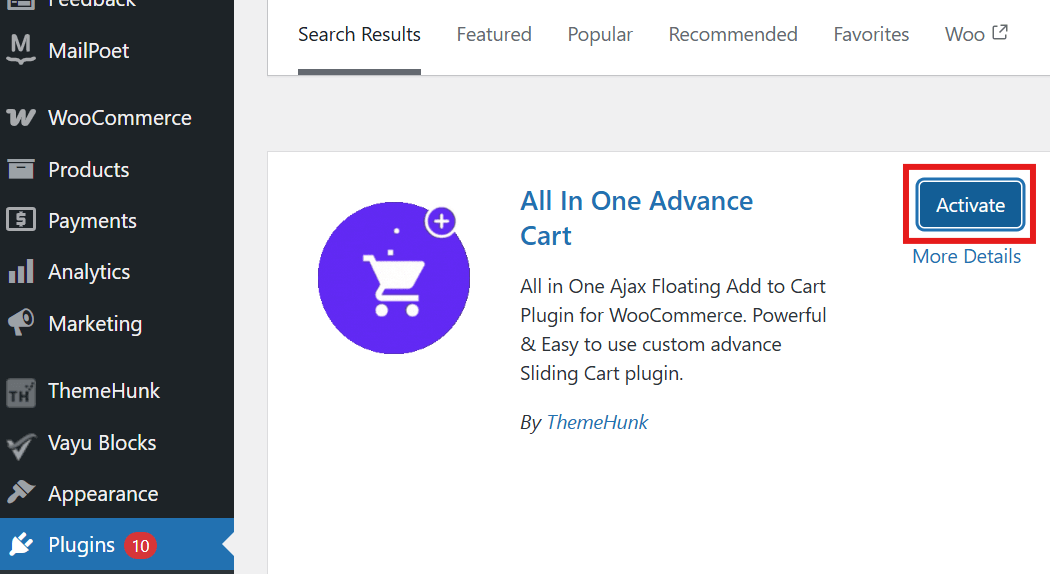
These steps apply to the free version. For the premium version, you’ll need to upload the plugin’s zip file. For detailed guidance, refer to the official documentation.
Configure the General Settings
You will see the ThemeHunk menu in your Dashboard. Click it to access All in One Woo Cart settings.
- Go to All in One Woo Cart > General.

- Here, you can enable or disable the floating and fixed cart layouts.
- If you have the premium version, you can choose from different cart styles and positions under the “Cart Style“ option.

Customize the Cart Basket
Now, you can customize the appearance of the cart basket.
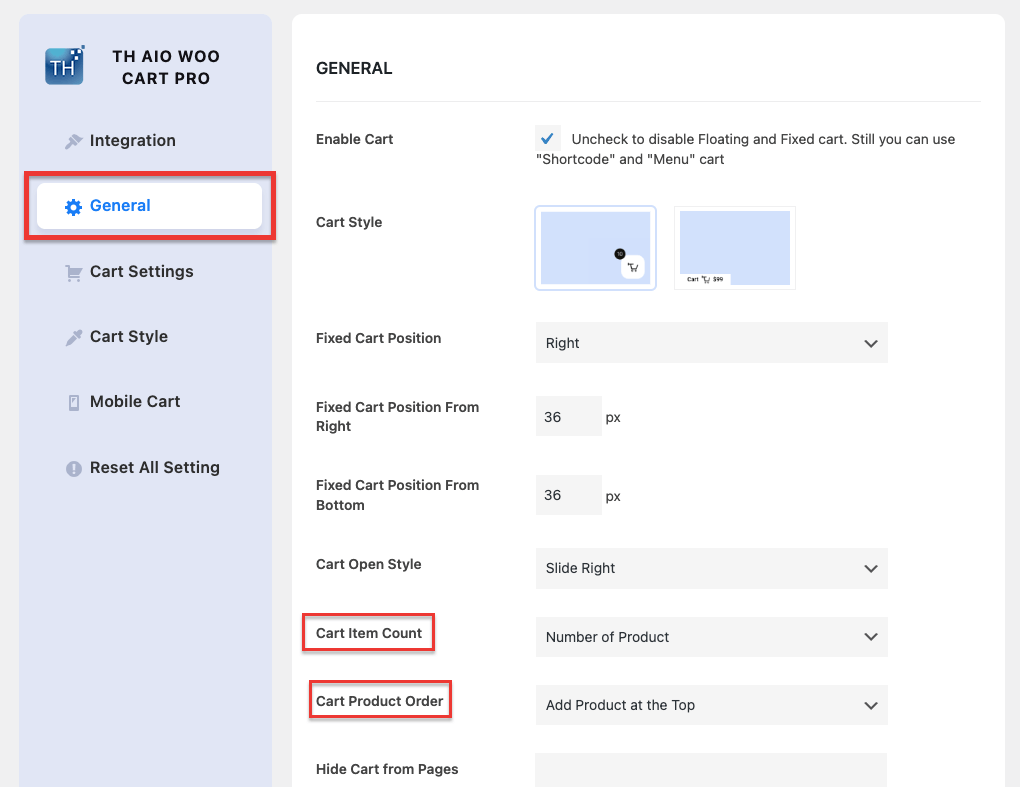
- Here, you can customize the cart item count and the order in which products are displayed.
- You can also choose a variety of cart basket icons or upload your own.
Enable Real-Time Notifications
The real-time cart notifications to WooCommerce is a core part of the plugin and is enabled by default (Auto open with Ajax) when you activate the plugin.
The “fly to cart” animation, a key part of the notification, is available in the pro version. This animation provides a clear, visual confirmation that the item has been successfully added.
Advanced Customization
The plugin offers plenty of advanced customization options. By navigating to the various settings tabs, you can:
- Hide the cart on specific pages, like the checkout page.
- Customize cart headings and button text.
- Style the cart’s colors, fonts, and other design elements (premium features).
FAQ
Q: What are real-time cart notifications in WooCommerce?
Ans: Real-time cart notifications in WooCommerce is instant updates that appear when the customer adds, removes, or changes the quantity of products in their cart, without requiring a page reload. They improve the shopping experience by giving instant feedback.
Q: How do I add real-time cart notifications in WooCommerce?
Ans: You can add them by using plugins like All in One Woo Cart. Once installed and activated, the plugin automatically cart contents via Ajax and can show a floating/fixed cart panel with real-time changes.
Q: Is the All in One Woo Cart plugin free?
Ans: Yes, the plugin offers a free version in the WordPress repository, providing core cart features like floating or fixed displays with real-time updates. To unlock advanced options, such as fly-to-cart animations, custom-styled notifications, product suggestions, and coupon fields, you’ll need the Pro version.
Q: Does this plugin work with any WooCommerce themes?
Ans: Yes. The All in One Woo Cart plugin is compatible with all WooCommerce themes. It also adapts to theme styling, and you can further customize its appearance in the settings panel.
Q: Does it work on mobile devices?
Ans: Yes. The plugin is fully responsive. In fact, the Pro version allows you to customize or disable certain features on mobile for a cleaner experience.
Final Words
Real-time cart notifications to WooCommerce are a powerful way to enhance your eCommerce store.
With the All in One Woo Cart plugin, you get instant feedback, dynamic cart options, targeted messages, and Premium features like upsells and mobile controls, creating a smoother shopping experience that boosts engagement and conversions.
Thanks for reading this blog. If you find this article helpful, do share it with your friends. If you have any questions, do not hesitate to comment below. We will help you solve your problem.
We hope this article will help you understand how to add real-time cart notifications to WooCommerce.
Please subscribe to our YouTube Channel. We also upload great content there. Do follow us on Instagram, Facebook, and Twitter.